
Building a drama-recap channel: format, cadence, and where the clips come from
A drama-recap channel needs three decisions before you touch an editor: a format that matches your platform and patience level, a cadence you can actually sustain, and a reliable, repeatable way to source clean footage. This guide walks through all three — including why most recap creators source episodes with a dedicated downloader like Hongguo Downloader instead of screen-recording streams.
Most people who try a drama-recap channel don't fail because their edits are bad — they fail because they never settled on a format, burned out trying to post daily, or spent more time wrestling with screen recordings than actually editing. Fix those three things first and the rest gets a lot easier.
Why short-drama recaps work as a channel
Chinese short-dramas (短剧) and AI-generated short-dramas are built for exactly this kind of repackaging: each episode is a minute or two long, cliffhanger-driven, and visually dense — a season can be summarized in a way that still lands the emotional beats. That's a big part of why recap and highlight-reel content built around this genre keeps showing up on TikTok, YouTube Shorts, and Reels — the source material is already shaped like short-form video.
Picking a format
Don't try to do all of these at once. Pick one, run it consistently for a few weeks, and let the results tell you whether to keep it, tweak it, or switch.
- The hook trailer. A 30–60 second cut built entirely around the premise and a cliffhanger, with no resolution — the goal is to drive curiosity, not summarize the plot. Works well as a low-effort, high-frequency format.
- The single-video full recap. One longer video (3–8 minutes) that walks through an entire series' arc with voiceover narration. Higher production time per video, but each one stands alone and can rank in search/recommendation for a long time.
- The per-episode mini-series. One short clip per source episode, posted as a running series so viewers follow along and come back for the next part. Highest posting frequency, but needs the most consistent sourcing — you're always a few episodes ahead of what you've published.
A reasonable starting point for a solo creator: hook trailers to test which dramas your audience responds to, then commit a full recap or a mini-series to whichever titles actually get traction.
Setting a cadence you can keep up
The single biggest reason recap channels stall isn't lack of ideas — it's picking a posting schedule that only works for the first two weeks. A cadence that's boring but sustainable will always outperform an ambitious one you abandon in month two.
- Batch your sourcing. Download source footage for several dramas in one sitting (a weekend, say) rather than sourcing per-video. That decouples "finding good source material" from "publishing today," so a slow week for ideas doesn't mean a missed post.
- Match cadence to format. Hook trailers are light enough to post most days; full recaps realistically land at 1–2 a week for most solo creators; mini-series need a buffer of already-edited episodes so a busy week doesn't break the sequence.
- Plan around your free daily downloads. If you're on Hongguo Downloader's free tier (2 series a day), sourcing for a week of content means spreading your downloads across a few days rather than trying to grab everything the night before a posting deadline. A one-time key removes that limit if your cadence needs more volume.
Where the clips actually come from
Recap channels live or die on footage quality — a blurry, watermarked screen recording undercuts even a great edit once a platform re-compresses it. That's the specific problem Hongguo Downloader is built to solve: it pulls the real 1080p source video files for a series directly, rather than recording whatever plays on screen.
- A large, searchable catalogue to pick from. The app's Catalogue tab lets you browse, search, sort, and filter 40,000+ verified 红果 dramas directly in the app, so finding your next recap subject doesn't mean hunting across the web first.
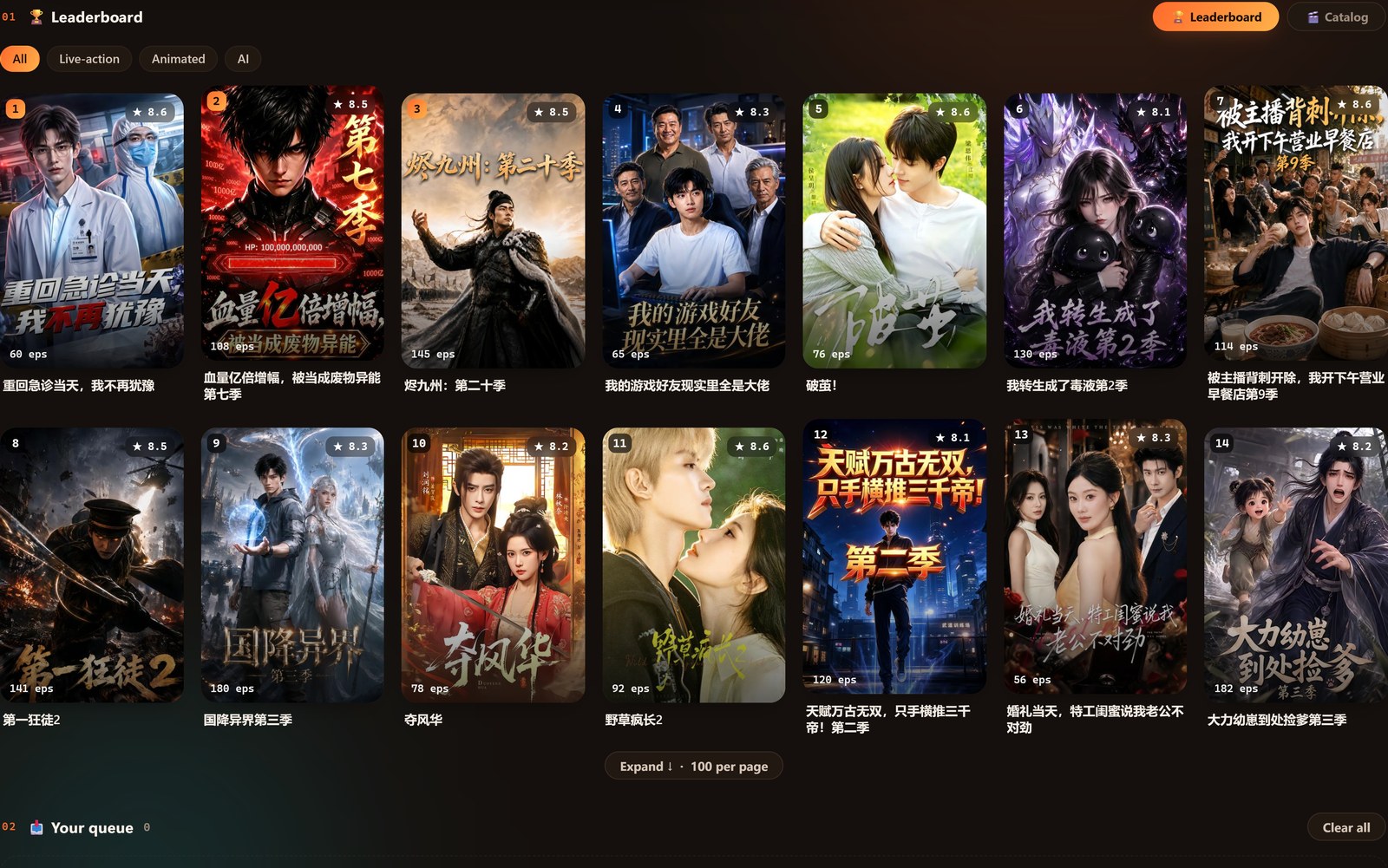
- A live leaderboard for what's trending now. The home screen's Leaderboard tab — a real-time 红果 ranking switchable by All / Live-action / Animated / AI — is a fast way to spot what's currently popular, useful for timing a recap while a title is still gaining attention.
- Batch download, not one episode at a time. Search a title, queue the whole series, and every episode saves as a numbered 1080p
.mp4file — ready to drop straight into CapCut, Premiere, or DaVinci without any cropping or de-blurring first.
A simple weekly workflow
- Scout. Check the live leaderboard and Catalogue tab for a title that fits your format and audience.
- Source. Queue the full series in Hongguo Downloader and let it batch-download in the background.
- Cut. Pull the beats your format needs — a premise and cliffhanger for a hook trailer, the full arc for a recap — and add your own voiceover, captions, or commentary.
- Schedule. Post on the cadence you set, not the cadence you wish you had.
- Repeat. Source the next batch before this week's queue runs out, so you're never editing under a sourcing deadline.
Staying on the right side of things
A recap channel should be a transformative edit of source material you've downloaded for personal use — your own commentary, voiceover, pacing, and selection of highlights — not a straight re-upload of full episodes. Keep downloads for your own editing use, credit the source drama where it's natural to do so, and don't imply your channel is affiliated with 红果 or the drama's original creators. Note that the legality of downloading streaming content in the first place is a gray area that varies by country — see our safety & legality guide for the honest version. None of this is legal advice.
Frequently asked questions
What's the best video format for a drama-recap channel?
There's no single best format — a hook trailer, a full-series recap, and a per-episode mini-series each suit different platforms and audience patience. Pick one, run it for a few weeks, and let engagement guide the next move.
How often should a drama-recap channel post?
A cadence you can sustain for months beats a burst you can't keep up. Most solo creators do better batching sourcing weekly and posting 2–4 times a week than trying to post daily from day one.
Where does the source footage come from?
Hongguo Downloader pulls full 1080p episode files directly from the 红果 oversea catalogue's 40,000+ dramas, so there's no screen-recording, blur, or UI overlays to deal with.
Is it okay to just repost full episodes?
No — treat downloads as source material for your own transformative edit, not something to re-upload whole. Downloading itself sits in a legal gray area that varies by country; this isn't legal advice.
Start sourcing your first batch
Download Hongguo Downloader and pull clean 1080p source footage for your next recap — no screen recorder needed.